EvernoteがIMAPに対応してたのでiPhoneで読んでみた
Evernoteに保存してあるノートがIMAP経由で読めると言うことを知ったので、iPhoneに設定してみました。 iPhoneアプリのEvernoteを使わないメリットはないような気がするんですけど…。オフラインで閲覧できてるようでは...
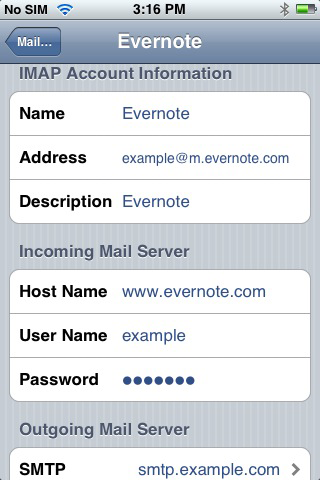
Evernoteに保存してあるノートがIMAP経由で読めると言うことを知ったので、iPhoneに設定してみました。iPhoneアプリのEvernoteを使わないメリットはないような気がするんですけど…。オフラインで閲覧できてるようではないし。
Incoming Mail Server (IMAP):
Host Name: www.evernote.com
User name: your Evernote user name (not your email address)
Password: your Evernote password
Port: 143 (or 993 for SSL)
Address or Email Address: Enter your Evernote incoming email address (To find your Evernote e-mail address for incoming mail, login to www.evernote.com and click the Settings link.) Outgoing Mail Server (SMTP): Use the same SMTP settings as the other accounts on your mobile device. Please contact your service provider for specific settings.
( Evernote IMAP )
【関連記事】
Images
LATEST STORIES
最新ブログ記事
AI活用と業務設計の現場で得た知見を、実例とともにお届けします。